|
CPD News Index
|
The IUCr-CPD Homepage is at http://www.iucr.org/iucr-top/comm/cpd/
FullProf.98 and WinPLOTR New Windows 95/NT
Applications for Diffraction.
Juan Rodríguez-Carvajal and Thierry Roisnel
Laboratoire Léon Brillouin (CEA-CNRS), Centre d’Etudes
de Saclay 91191 Gif sur Yvette Cedex, FRANCE.
E-mail: juan@bali.saclay.cea.fr;
roisnel@llb.saclay.cea.fr
The program FullProf is widely used in powder diffraction
data analysis on different computer environments. During
the first half of 1998 profound changes have been
introduced in its source code. The most important is the
complete transformation of the source code to the new
standard Fortran 90, using the new syntax and features
(suppression of COMMON statements, introduction of
modules, interfaces, types, etc). This is now distributed as
the beta-version of FullProf.98 (only for DOS/Windows
95/NT at present). Simultaneously, the program
WinPLOTR has been developed in Fortran 90 for the
Windows 95/NT platform (Lahey Fortran 90 compiler and
RealWin to access the Windows API from Fortran 90). This
program can be used for various purposes: visualisation of
powder diffraction patterns, interactive profile fitting and as
a GUI for FullProf.98 and other programs. The program
WinPLOTR has all the features of a conventional Windows
application using the mouse to select menus, tools in the
toolbar, to answer to dialog boxes, to resize and to move
windows, to scroll, etc. When a diffraction pattern is
displayed in the graphic window the drag operation
(pressing, move and release) is available with the left mouse
button to zoom the pattern plot. Click with the right mouse
button redisplays all the data points of the pattern. In any
case the move of the mouse inside the graphic window gives
information (in the status bar) about the X and Y positions,
in physical units. Among the features of WinPLOTR we
can point out the following:
- All the main arrays have the ALLOCATABLE attribute. The
actual dimensions can be controlled by the user, at run-
time, through the text file winplotr.set. This file
serves to store the settings of the program. The current
settings can be saved from the program itself.
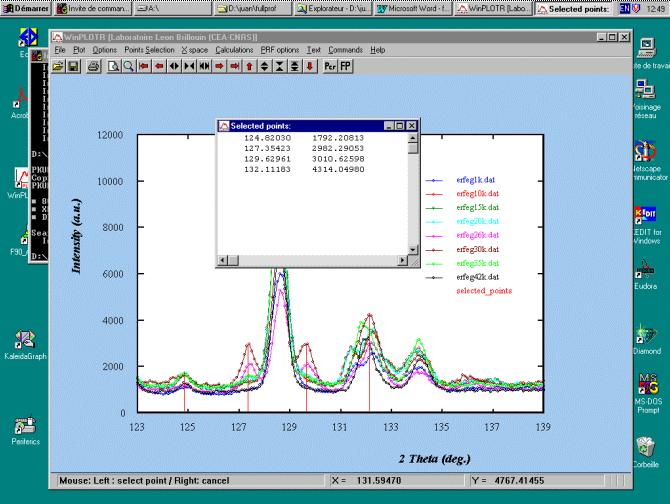
Figure 1: Screen copy of the main window of WinPLOTR, showing a
zoomed region of several diffraction patterns of ErFe4Ge2 at different
temperatures. The small window shows the positions and intensities of
several peaks selected by the user.
- Total control of the style, colours, size of symbols, fonts,
line width of graphics.
- Selection of points for background and peaks that can be
stored in a file (see Fig. 1).
- Many formats for the diffraction data files can be read:
those of FullProf, GSAS and some others. Multiple
patterns can be plot by accessing to a buffer file.
- The graphics can be saved as PostScript and HPGL files
or printed directly.
- Selection of the units of the X-axis: 2*(deg.)/TOF(*
sec.), sin*/*(Å-1), Q(Å-1), d(Å).
- Interactive calculations (sum, difference, multiplication,
centroid, integration) with the diffraction patterns in the
current plot.
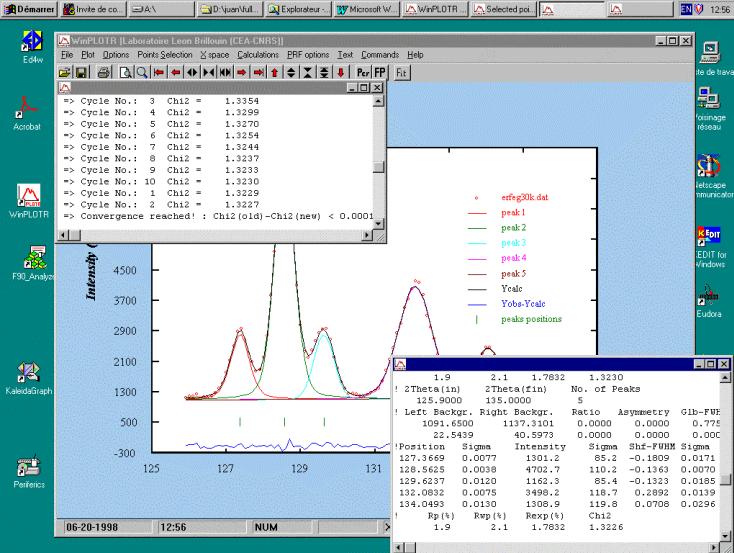
- Interactive profile fitting to independent pseudo-Voigt
functions using the non-linear least-squares Marquard
algorithm (see Fig. 2). All starting parameters and
refinement flags can be selected by clicking with the
mouse.
Figure 2: Aspect of the screen after an interactive profile refinement
session.
- Direct launch of FullProf from the pop-up menu or by
clicking a button. Automatic plot of the CODFIL.prf file.
The file CODFIL.pcr can be directly accessed by an editor
selected by the user and stored in the winplotr.set file.
By default Notepad is used.
- Visualisation of the hkl indices of reflections selected
with the mouse when an observed-calculated pattern
coming from FullProf is in the current window.
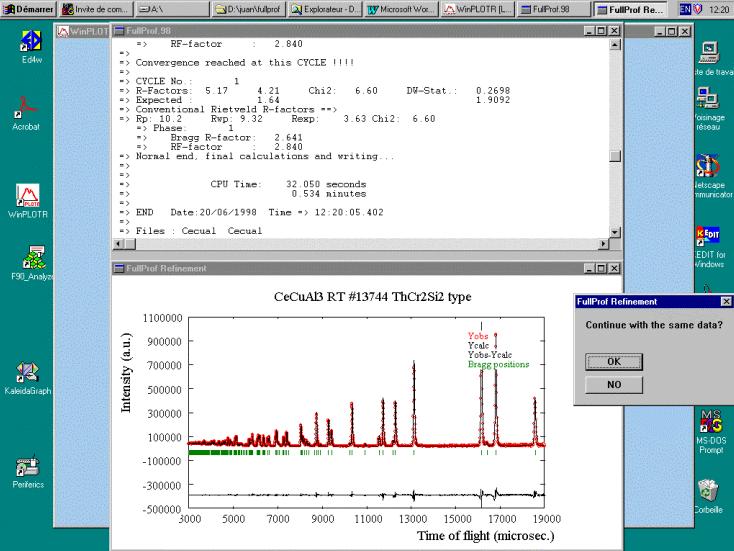
The Windows beta-version of FullProf.98 has the same
features as the version 3.5 of FullProf but a step-wise
refinement option is available in which the observed versus
calculated profile is displayed at each cycle and the user is
asked to accept or not the continuation of the refinement
(see Fig.3).
A summary of the most important features of FullProf.98 is
given below:
- The program can treat multi-phase diffraction patterns
(up to 8 phases) of X-rays, laboratory and synchrotron
sources, or neutrons, constant wavelength and time of
flight (TOF).
- One or two wavelengths can be used (eventually with
different profile parameters).
- The background can be fixed, refinable, adaptable, or
adjusted by Fourier filtering.
- There are different choices of peak shape for each phase:
Gaussian, Lorentzian, modified Lorentzians, pseudo-
Voigt, Pearson-VII, Thompson-Cox-Hastings (TCH)
pseudo-Voigt, numerical, split pseudo-Voigt,
convolution of a double exponential with a TCH pseudo-
Voigt for TOF.
- The absorption correction is available for different
geometries. The micro-absorption correction is
implemented for the Bragg-Brentano set-up.
- There are two methods for magnetic structure refinement
(crystallographic and spherical representation of the
magnetic moments). The first describes the magnetic
structure in the magnetic unit cell. The second makes use
of the propagation vector formalism using the
crystallographic unit cell. This second method is
necessary for incommensurate magnetic structures.
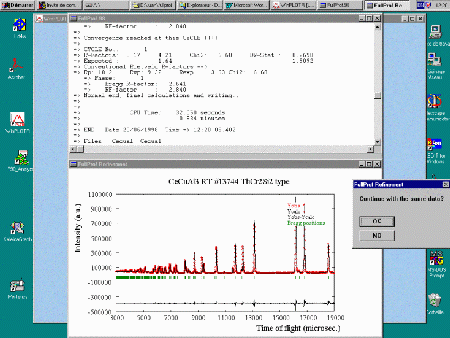
Figure 3: Layout of the screen during the execution of FullProf.98 in
step-wise mode when launched from WinPLOTR.
- Automatic generation of reflections for an
incommensurate structure with up to 24 propagation
vectors. Refinement of propagation vectors in reciprocal
lattice units.
- hkl-dependence of FWHM for strain and size effects.
- Profile Matching. The full profile can be adjusted without
prior knowledge of the structure: it needs only good
starting cell and profile parameters.
- Quantitative analysis without need of structure factor
calculations.
- Chemical (distances) and magnetic (magnetic moments)
slack constraints.
- Form factor refinement of complex objects (plastic
crystals). Rigid body-TLS model.
- The structural or magnetic model may be supplied by an
external subroutine for special purposes (polymers, small
angle scattering of amphifilic crystals, description of
incommensurate structures in real direct space, etc).
- Single crystal data or integrated intensities can be used as
observations (alone or in combination with a powder
profile).
- Neutron (or X-ray) powder patterns can be mixed with
integrated intensities of X-ray (or neutron) from single
crystal or powder data.
- A Montecarlo search for starting configurations, in a
user-defined parameter box, is available for use with
integrated intensity data.
The multi-pattern capabilities are not currently available in
the beta-version but they will be introduced in future
versions. The version with allocatable arrays (all dimensions
controlled by the user at run time) is not presently
distributed because there is a loss of the performance by a
factor of 3 with the Lahey compiler.
There is a project for a general GUI for FullProf.98 that is
been developed by Alain Bouvet (ILL, Grenoble). This GUI
will be directly multi-platform because is written in Java ; it
will allow the creation, from the scratch, of the main input
file using pop-up menus and buttons. The graphic
capabilities of the first version will probably not be as
powerful as those provided by WinPLOTR but it should be
enough for many purposes.
Beta versions of FullProf.98 and WinPLOTR are freely available
from:
ftp://charybde.saclay.cea.fr/pub/divers/fullprof.98/windows/winfp98.zip (both programs)
ftp://charybde.saclay.cea.fr/pub/divers/WinPLOTR/winplotr.zip (WinPLOTR alone)
|
![[IUCr Home Page]](iucrhom2.gif)
![[Commission Home Page]](cpd.gif)