![[IUCr Home Page]](iucrhom2.gif)
![[Commission Home Page]](cpd.gif)
|
|
The IUCr-CPD Homepage is at http://www.iucr.org/iucr-top/comm/cpd/
Aspects on using Java in crystallographySteffen WeberNIRIM, Namiki 1-1, Tsukuba, Ibaraki 305, Japan E-mail: weber@nirim.go.jp WWW: http://www.nirim.go.jp/~weber/
IntroductionJava is a relatively new programming language and it is still under development. Since the number of people working in the field of crystallography, who are interested to learn more about Java is growing I would like to point out some of Java's features that are of interest to crystallographers and leave it to the reader to access other sources on matters of Java language specifications etc. As a continuously growing language Java offers almost anything you might need to develop high-performance applications. The parts of Java that serve as standard libraries of ready-to-use methods are called Application Programming Interfaces (API). Among the newer developments are APIs for serial/parallel port communication, 2D/3D graphics, advanced image processing, speech recognition etc. Java's perhaps biggest advantages are its cross-platform portability, the easiness by which Graphical User Interfaces (GUI) can be created and multi-threading, which allows a program to perform multiple tasks independent from each other. Java is an interpreted language. The Java compiler generates so-called bytecode which is recognized by the file extension *.class. A Java interpreter will then convert this bytecode into machine dependent binary executable code. This interpreter, also referred to as Java Virtual machine (JVM), is available for many operating systems (OS), such as MS-Windows95/NT, Unix, Linux and the Mac OS. Everything needed for developing and running Java programs can be downloaded for free from the Internet in form of the Java Development Kit (JDKTM) [1]. The JDK, however, does not include an Integrated Development Environment (IDE), which is usually available for other programming languages. However, such IDEs for Java can be obtained as commercial third-party products especially for MS- Windows95/NT. One of the first Visual IDEs, which is actually written in Java and therefore runs on any OS with a JVM is Xelfi from Xelfi Technologies [2]. It has the look and feel known from Delphi's IDE. Among the non-visual development tools for MS-Windows95/NT ED4W from SoftAsItGets [3] is perhaps the best. Visual IDEs allow you to build your GUI by dragging components from a palette and dropping them in the design area. The frame work code is generated automatically and one only has to fill in the actual code. Note that some of the Java development tools available allow only the creation of applets, sometimes even without the possibility to actually write a single line of code. If you are interested in developing applets and applications you should choose an IDE, which offers both or just stick to the JDK and use your preferred text editor for coding. When writing Java programs it is a good practice to first create the whole GUI with menus, buttons etc. and write the actual code after that. The Java beginner should try to translate a functional program written in another language into Java. This can be done quite easily due to language similarities as in the case of C/C++. In such a translation note that arrays in Java start with index zero, unlike one as in Turbo Pascal for example. The absence of pointers in Java is another bonus, since one does not have to worry about memory allocations. It just be mentioned here that one of the newer concepts in Java's component architecture are JavaBeans, which are reusable components that are required by Visual IDEs. By writing your code as beans you may extend the palettes of components available for the creation of other programs. An example for a JavaBean is the MoleculeViewer bean from JavaSoft, which can also be seen in applet form on many websites.
1. Java applications versus appletsIt would be wrong to think that Java is just a language for writing nice applets to enhance the attractiveness of web pages. Applets have severe limitations that a developer has to be aware of, since it might influence one's programming style. For example applets can neither read from nor write to the local hard disk. Therefore an applet cannot read input files in the usual sense or create temporary files for later use in the programs execution. Data files can be accessed as URL documents, which is quite another thing. Furthermore one cannot print directly from within an applet or save output graphics. Therefore hardcopies of the applet's output cannot be easily obtained (apart from using screen capture utilities). Applets are useful for educational and demonstration purposes and make good programming exercises while learning Java. Several examples of crystallographic applets can be found on the authors homepage [4]. Apart from applets, which are embedded in a webpage and require a webbrowser or the JDK's appletviewer there are the stand-alone Java applications which can be run like any other software. Applications are what crystallographers are really interested in. Note that depending on its purpose and extent a Java program can be written in such a way that it can run both as an application or an applet. Java applications can use the full palette of the available APIs. Until the present version of the JDK (JDK1.1.6) the GUI of a Java program may have a slightly different look on different operating systems, because the corresponding OS dependent window managers are being accessed. With the next JDK1.2 the developer may choose to use Java's new Abstract Windowing Toolkit (AWT) extension named Swing. A GUI created using Swing would look the same independent from the underlying OS.
2. Calculation intensive programsIn case of computationally based programs, such as least squares refinement programs, Java may turn out to be too slow. One also might need to interface with some specialized hardware or drivers or one simply might want to reuse already available codes and libraries. In such cases one may use a combination of Java code and C code. C code is faster, and one does not have to recode already available code, apart from some modification for exchanging data types. FORTRAN programs can be converted to C code using some FORTRAN-to-C translator utility. 2.1 Linking native code When linking C code to your Java program using the Java Native Interface (JNI) cross- platform portability is decreased, since a platform dependent C-compiler has to be used if one wants to transfer the program to another OS. This will create some dynamic loadable library (DLL). On the Windows platform this is a *.dll file and under Unix a *.so file. This library file is loaded when a Java program containing native methods is started. One then has the possibility to exchange data between the Java side and the native side. From within the C code also system calls to other external programs can be done easily. One therefore can write a Java program where the only function of the Java side is to serve as a GUI while all computations are actually done using native code.
3. Graphics intensive programsOne of the strongest sides of Java is its graphics handling capabilities. Even with the standard APIs extensive graphics and image processing can be achieved (without specific 2D/3D APIs). With the new APIs in the forthcoming JDK1.2 those features will even leap to a much higher level. 3.1 Creating and saving images, image processing Graphics are displayed in Java's canvas component, which also includes mouse tracking possibilities. Thus the mouse can be used for example to shift, rotate and zoom images or to index Bragg reflexions in a diffraction pattern simulation. One can either just draw onto the the canvas and/or display images that are either loaded as GIF or JPEG files or calculated pixel by pixel. The latter is of particular importance, since no input graphics is needed. One may just declare a one-dimensional array of size [image_width*image_height], each array component standing for an integer value that contains the alpha and RGB information (alpha=transparency, red, green, blue). One may then calculate/manipulate each pixel at will and then use the MemoryImageSource() class to actually create the image to be displayed. One may also make copies of an image to apply special filters (brightness, contrast etc.), the source code of which can be found in many books or on the Internet. The author used this method among others to read 10 Mbyte large binary files representing Imaging Plate data, in order to display them on-screen. Since one has access to each pixel value one can easily write a peak search routine for example. If you were to compare two diffraction pattern images you could lay the second one over the first one with the background color of the second image switched to transparent. If you want to manipulate a GIF/JPEG image you may load it and obtain its pixel values using the PixelGrabber() class. Until now one has to use third-party Java packages if one wanted to save the contents of a canvas in form of a GIF file for example. The 2D API of the JDK1.2, however, will include the possibility to save the images as JPEG files, which may then be viewed or imported by other software. 3.2 Molecular graphics, 3D visualization Maybe the first applications that interested crystallographers were applets that were able to display molecules in 3D such as the above mentioned MoleculeViewer or the JaMM applet by J.N.Huffman [5]. The author is currently working on an application [6] with the intention to include more features then applets can offer. Such programs can be realized quite easily with Java. Since mostly non-penetrating balls and sticks are used no real 3D engine is needed for such a program. This only becomes necessary for displaying coordination polyhedra or interpenetrating atoms. The above mentioned programs use either shaded atoms that are calculated and created with the MemoryImageSource() class or loaded as small GIF files. In contrast when a molecule is displayed using VRML (Virtual Reality Modelling Language) atoms are rendered as polygonized spheres, which allows for simpler interpenetration algorithms. The key features needed to program graphics animation is fast repainting and the possibility to avoid flickering. Both can be achieved easily with Java. When dragging the mouse for rotating a molecule the canvas' repainting routine is called automatically. To achieve flicker-free animation one uses double buffering, whereby the next image (frame) is first drawn onto some image buffer and only displayed when it is finished. The same technique could be used to display some graph representing dynamically changing data. To make sure that atoms are correctly drawn from the back to the front one uses the z- buffering technique (useful only for raster graphics; z-value of each pixel is saved in a special buffer) or one can order the z-coordinates of the atoms with a quicksort algorithm (this is better for vector graphics; eg.: if you also want to produce PostScript output). The same simple 3D routines, which are basically the rotations around the three principal axes and the quicksort routine may be used for other visualization tasks in cystallography such as the display of reciprocal lattice points for indexing diffractometer data. Using mult-threading one may also create a separate thread that keeps the animation going while the GUI can be accessed to perform other tasks.
4. Serial port communication
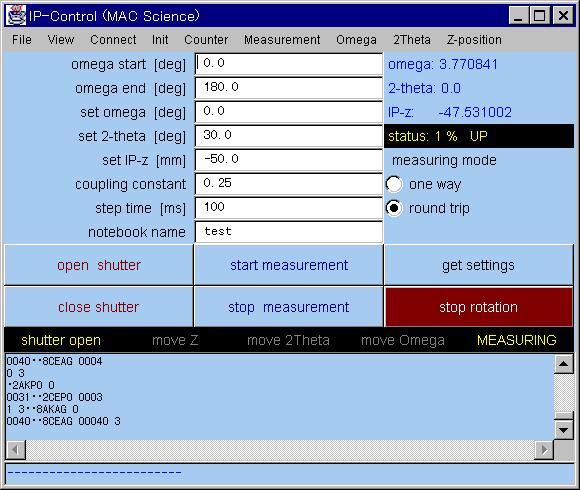 A very interesting field for the application of Java programs might be the creation of control software for goniometers, diffractometers etc. This is now possible with the early release of the new serial/parallel port communication API (javax.comm). With this API one may specify port settings and open connection to an external device. If one wishes to execute the software on Windows and Unix platforms one only needs to specify the correct port identifier name which may be of the form "COM1" or "/dev/term/a". A software example for controlling a Mac-Science goniometer can be seen at [7]. That program uses a separate thread for the measurement. Thus access to the GUI is maintained and the execution may be stopped, paused, continued at any time. Java furthermore offers an internal counter in units of milliseconds, which gives the developer more control over the speed of stepping motors.
5. Realizing Software DocumentationsOne possibility to realize documentations, tutorials, online help and support information is to do it all in HTML format and integrate a HTML browser component into your software. Since Java programs are network-aware you may put all files on your webserver and users of your software will access those files, which gives you the possibility to provide the users always with the latest updated documentations. At present there is good HTML browser component available from ICEsoft A/S [8]. If you want to see it in action you may look at the software JSV [6] where it is implemented.
6. Some of Java's downsidesThe two major shortcomings concern speed and printing. Java beeing an interpreted language is bound to run slower than when executing compiled native code. A solution to this is the use of Just-In-Time (JIT) compilers, which convert Java's bytecodes into native processor instructions before execution. This may increase the performance by up to 10 times. JIT compilers are already implemented in current webbrowsers and will be part of JDK1.2. The Java microprocessor chip, which will run Java programs as fast as native code is another development to solve this problem. The other problem is printing. Till JDK 1.1.6 there is no easy way to print out your graphics, however, the new 2D API in JDK1.2 will provide solutions at least for the Windows and Solaris platforms. If you do not want to depend on developments in this area, you may code PostScript output capabilities into your software [9] (contact author for tips on PostScript). Furthermore note that your Java code can be retrieved from the bytecode (*.class files) by using some Java decoder. If you want your code to be unreadable you may use for example MochaSoft's Source Obfuscator [10] before compilation.
ConclusionJava is very suitable for such crystallographic applications that require either a GUI, extensive graphics features or both. Its cross-platform portability may save coding time and allow a wide distribution of one's software. Both very welcome to the developer. For computationally based programs (eg. refinement software) native C code should be linked to the Java program, which, however, decreases its cross-platform portability.
References
Please feel free to email any queries to:
r.j.cernik@dl.ac.uk
|